How to Write an Invoice: Essential Tips for Freelancers 2026
If you’ve ever finished a project and then spent an awkward week chasing payment, the problem usually isn’t your client, it’s your invoice. I have realized that most people don’t even know the difference between an invoice and a receipt and when they are needed.
How to Write an Invoice: A Complete Guide for Freelancers
A poorly written invoice is easy to ignore. A clear, professional one gets paid. This guide walks you through exactly what to include, how to format it, and the mistakes that quietly delay your money.
By the end of this article, you will be able to write an invoice in under five minutes and I will give you a free invoice tool to generate one instantly.
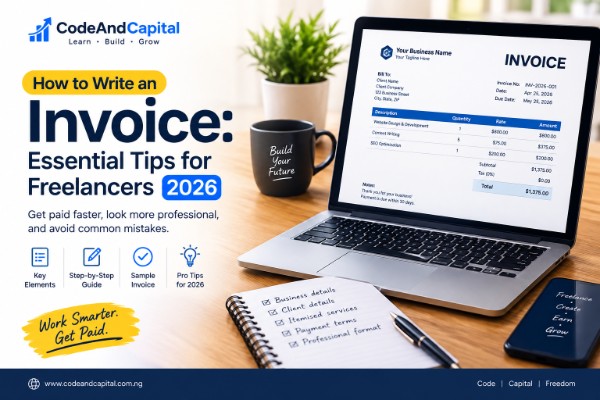
What is an invoice?
An invoice is a document you send to a client requesting payment for goods or services you’ve already delivered. It states what you did, how much you’re owed, and when payment is due.
An invoice is not a quote (sent before work begins) and not a receipt (sent after payment is received). It’s the formal request for money, the document that tells your client “this is what I did, this is what you owe.” Below we will look at the difference between and invoice and receipt then how to write an invoice
What’s the difference between an invoice and a receipt?
Invoice Vs Receipt: They look similar but serve opposite purposes:
| Invoice | Receipt | |
|---|---|---|
| Sent | Before payment | After payment |
| Purpose | Request money | Confirm money received |
| Issued by | Seller/service provider | Seller/service provider |
| Timing | On delivery of work | On receipt of payment |
You send an invoice, the client pays, then you (or they) issue a receipt. Both documents matter for record-keeping especially if you file taxes or run a business account.
The 8 elements every invoice needs
If your invoice is missing any of these, expect delays.
1. Your business name and contact details
Legal name, trading name (if different), address, email, and phone. If you’re registered, include your business registration number.
2. The word “Invoice”
Sounds obvious, but clients receiving dozens of documents a day rely on the label. Big and clear at the top.
3. A unique invoice number
Format like INV-2025-001 or INV-1042. It must be unique — never reuse a number. This is how you and your client reference the invoice later.
4. Invoice date
The date you’re issuing the invoice (usually the day you finish the work or the day the billing period ends).
5. Client’s details
Their business name and the name of the person you’re billing. If it’s a company, include the department or contact person.
6. Line items
Each item or service on its own row, with four columns:
– Description: what you did (be specific: “Logo design — 3 concepts and 2 revisions” beats “Design work”)
– Quantity: hours, units, or number of deliverables
– Rate: price per unit or per hour
– Amount: quantity × rate
7. Grand total
The sum of all line items. If you charge tax, add a separate line for it.
8. Payment terms and due date
“Net 30” means payment is due 30 days from the invoice date. Some freelancers use Net 14 to speed things up. Also include how to pay: bank name, account number, or payment link.
Optional but useful: a purchase order (PO) reference, a thank-you note, or a short list of what’s not included if the scope could be ambiguous.
Step-by-step: How to write an invoice
Follow these eight steps in order and you’ll never miss a field.
1. Start with your business information.
Name, address, email, phone. Put it at the top.
2. Label the document.
The word “Invoice” should be unmistakable.
3. Assign an invoice number.
If this is your first invoice of the year, use INV-2025-001. Keep a simple spreadsheet or document listing every number you’ve issued.
4. Add the invoice date and due date.
Be explicit. “Due: 15 November 2025” beats “Net 30” if your client isn’t used to invoicing terms.
5. List the client’s details.
Their name, business, and billing address.
6. Fill in the line items.
Every service or product gets its own row. Don’t lump everything into one line — it makes you look unprofessional and invites disputes about scope.
7. Add the total and payment details.
Grand total in a clear box. Bank details or payment link right below.
8. Add notes if needed.
Payment terms, late-fee policy, a thank-you note, or a PO reference.
Then send it as a PDF by email, usually. We’ll cover that below.
Invoice Sample
Here’s what a simple freelance invoice looks like in practice:
INVOICE  ·  INV-2025-014
Date: 04 October 2025       Due: 18 October 2025

From:                          Billed To:
Jane Adeyemi                   Acme Studio Ltd.
hello@janeadeyemi.com          Attn: Bola Okafor
+234 800 000 0000              Lagos, Nigeria

─────────────────────────────────────────────────
Description              Qty   Rate        Amount
─────────────────────────────────────────────────
Homepage design          1     ₦150,000    ₦150,000
Inner pages (x4)         4     ₦35,000     ₦140,000
Copywriting              1     ₦60,000     ₦60,000
─────────────────────────────────────────────────
                              TOTAL DUE     ₦350,000
─────────────────────────────────────────────────

Payment: GTBank · 0123456789 · Jane Adeyemi
Terms: Net 14. Late payments attract 5% monthly.
Thank you for your business.
That’s it. Nothing fancy but every essential field is there.
Common invoice mistakes that delay payment
- No due date. “Pay whenever” means “pay never.” Always state the date.
- Vague line items. “Consulting — ₦200,000” tells your client nothing. Break it down.
- Wrong currency or ambiguous symbols. If you’re billing a client abroad, spell out the currency: “USD $1,200” not “$1,200.”
- Duplicate invoice numbers. Creates chaos in the client’s accounting system and often freezes payment until they sort it out.
- No payment details. You’d be surprised how often invoices arrive without bank info. The client has to email back and ask days lost.
- Sent to the wrong person. Always confirm the billing contact before you send. If it’s a large company, ask for their accounts payable email.
- Attached as a Word doc. Use PDF. Word files render differently on different machines and look unprofessional.
How to send an invoice
Email is standard. Attach a PDF and put the invoice number in the subject line: Invoice INV-2025-014 — Acme Studio Ltd.
Use a proper email body, not just an attachment. Three lines:
“Hi Bola, please find attached invoice INV-2025-014 for the homepage and inner-page work delivered in September. Payment is due 18 October. Let me know if you need anything else.”
Send a copy to yourself so you have proof of when it went out.
If they asked for it another way (uploaded to a portal, printed, sent via WhatsApp), respect that. Getting paid on time matters more than your preferred workflow.
What to do when an invoice goes unpaid
Most invoices get paid on time. Some don’t. Here’s the sequence that works:
Day 1 after due date — Friendly reminder email. Assume oversight, not malice.
Day 7 — Second email, slightly more formal, referencing your original invoice number and due date.
Day 14 — Phone call. Emails are easy to ignore; voices are harder.
Day 30 — Formal notice. Restate the amount, the original due date, and any late fee you stated on the invoice.
Day 45+ — Decide whether to escalate (debt collection, small claims) or write it off and stop working with that client.
Whatever you do, don’t stop communicating. Silence is how invoices die.
Do you need invoicing software?
Not for most freelancers. Software like FreshBooks or Wave is worth it when you:
– Send more than ~10 invoices a month
– Need recurring invoices or automated reminders
– Track expenses and reconcile payments in one place
– Have an accountant who needs exports
For everyone else, a simple template or a good online generator is faster and cheaper.
A free way to create an invoice in two minutes
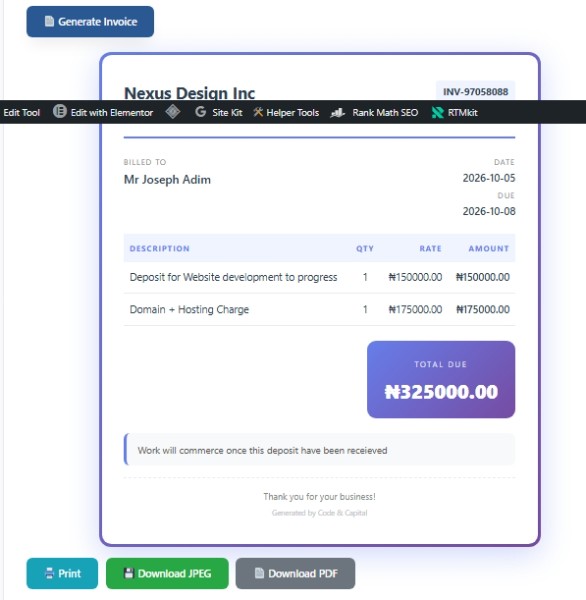
If you’d rather not build an invoice from scratch every time, our Invoice Generator handles the layout, calculates your totals automatically, and lets you download a print-ready PDF or JPEG. No sign-up, no watermark, no data stored on our servers — everything runs in your browser.
Enter your details, add your line items, generate, download. That’s it.
Frequently asked questions
How long should an invoice be?
One page is standard. Two is acceptable for complex projects. If it’s longer, attach a separate scope-of-work document.
Do I need to include a tax ID on my invoice?
Only if you’re VAT-registered or your client requires it. In Nigeria, businesses registered for VAT must include their TIN and state the VAT amount as a separate line item.
Can I send an invoice before the work is done?
Yes — a deposit invoice or advance invoice is common on larger projects. State clearly that it’s a deposit against future work, and issue the balance invoice when the project closes.
What if the client asks me to change the invoice date?
It’s a red flag. Changing a date usually means they want to push payment into the next accounting period. Politely decline unless they’ve already agreed to a new due date in writing.
What’s the difference between “Net 30” and “Due on receipt”?
“Net 30” means payment is due 30 days after the invoice date. “Due on receipt” means immediately. Neither is enforced by law, they’re expectations but you can add a late fee clause to make them stick.
Should my invoice include a thank-you note?
Yes. It’s a small gesture that costs nothing and improves how clients respond. One line — “Thank you for your business” is enough.
Can I use the free Invoice Generator for client work?
Absolutely. There’s no restriction, no branding forced onto your invoice beyond a small credit line you can edit, and nothing is stored on our servers.
Written by Code & Capital — we build free tools for content creators, freelancers, and small businesses. Try the Invoice Generator or browse all free tools.
Thanks for reading our guide on “How to write an Invoice”
One Comment